
Structured summary
Create a clean text snapshot instead of manually explaining every paper position, alert, and recent simulated trade.
SimuTradeX AI Snapshot helps turn virtual portfolio data, open paper positions, simulated trades, price alerts, automation rules, and review notes into a clean context block for external AI-assisted reflection.
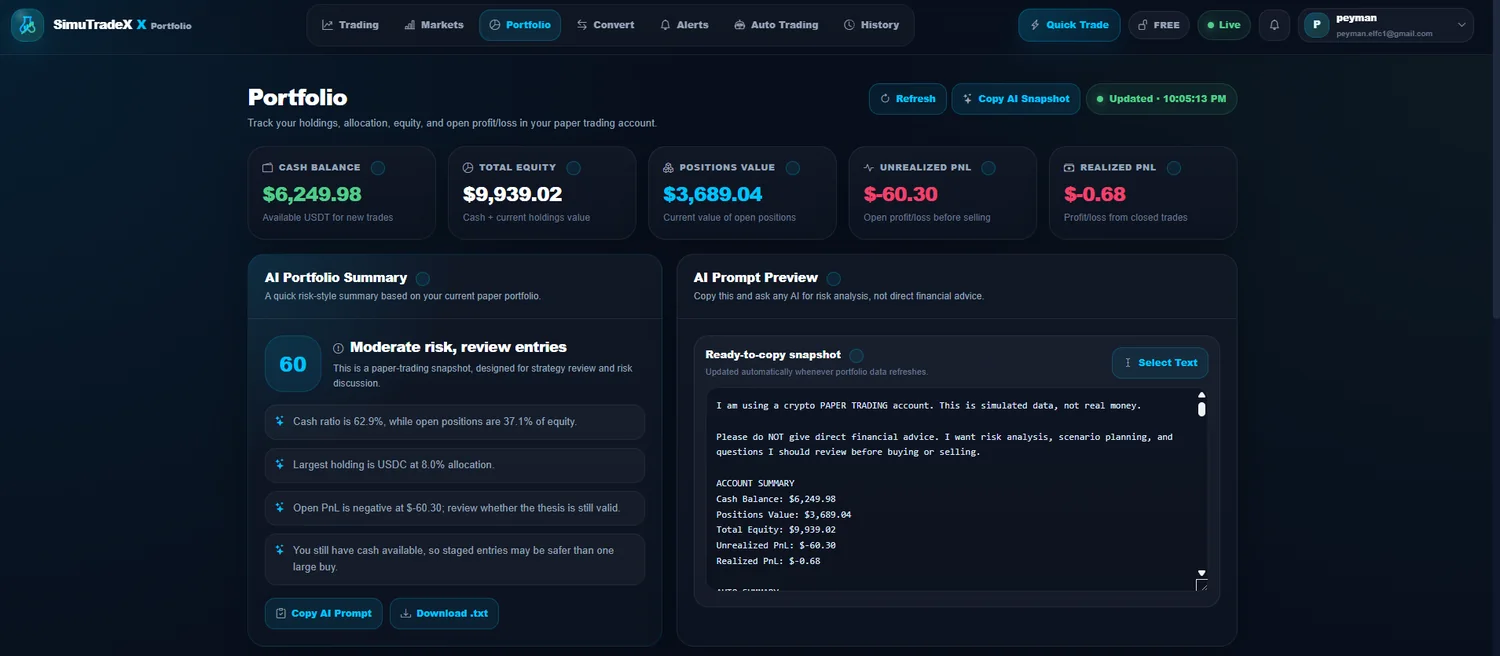
Instead of manually describing every simulated position, trade, alert, and rule, export a structured AI-ready snapshot. The goal is to make paper trading review easier, clearer, and more repeatable.
Create a clean text snapshot instead of manually explaining every paper position, alert, and recent simulated trade.
Include virtual cash, equity, allocation, open positions, unrealized PnL, and practice account status.
Bring recent paper trades, alert triggers, and simulated automation activity into the review process.
Show active or triggered price alerts so an external AI tool can understand the levels you were watching.
Copy a formatted context block that is easier to paste into an external AI assistant for reflection.
Use snapshots for learning, decision review, and process improvement, not financial advice or trading signals.
A useful AI review starts with enough context. SimuTradeX packages the key paper trading details that often get lost when users manually write a prompt from memory.
Virtual balance, simulated equity, available cash, open paper positions, and high-level performance context.
Coin symbols, position size, average entry context, unrealized PnL, allocation, and current portfolio exposure.
Recent simulated buy and sell decisions, alert activity, rule executions, and watchlist context.
Risk reminders, paper trading limits, educational framing, and a cleaner prompt for external AI discussion.
The best use of AI Snapshot is not to chase predictions. Use it as a structured trade journal companion that helps you review habits, risk, timing, and consistency.
Practice paper trades, set alerts, and let your portfolio history create useful review context.
Export a concise AI-ready summary of your virtual portfolio, simulated trades, alerts, and rules.
Use the snapshot as context for educational review, habit reflection, or trade journaling prompts.
Compare AI feedback with your own notes, then refine your next paper trading routine.
AI can help organize thinking, but it should not replace your own judgment. Keep snapshot review focused on process, risk awareness, and learning from simulated results.
Before sharing a snapshot externally, review the text and remove anything personal or unnecessary.
Use prompts about risk, consistency, position sizing, and review habits rather than asking for guaranteed predictions.
Treat AI feedback as one review input and verify it against your simulated trade history and portfolio data.
SimuTradeX snapshots are designed for learning and reflection, not investment recommendations.
These answers clarify how AI-ready snapshots fit into the SimuTradeX paper trading workflow.
An AI-ready portfolio snapshot is a structured text export that summarizes a virtual crypto portfolio, paper positions, simulated trades, alerts, and review context so an external AI tool can understand the practice setup faster.
No. SimuTradeX AI Snapshot is for educational review and portfolio context export only. It does not provide financial advice, price predictions, or real-money trading signals.
A snapshot may include virtual cash, simulated equity, open paper positions, allocation, unrealized PnL, recent paper trades, alert context, automation activity, and review notes.
Yes, you can copy the snapshot into an external AI assistant for educational reflection. Review the text first and remove any information you do not want to share with that third-party service.
It is useful for crypto learners who want a clearer paper trading journal, better simulated portfolio review, and more structured prompts for external AI-assisted reflection.
Start with paper trades, alerts, and portfolio tracking. Then use AI Snapshot to turn your simulated activity into a clearer review prompt.
SimuTradeX gives you a calmer way to practice crypto decisions with virtual funds, structured review, and a workspace built for learning instead of impulse trading.
Education only. No financial advice. No real-money trade execution.
Test trade ideas with virtual funds before exposing real capital to fast market moves.
Use alerts, portfolio context, and history review to improve decisions over time.
Begin with a free paper trading account and upgrade only when you need more room.